
Best WordPress SEO plugins in 2026, compared
By Anis Harbaoui, SEO specialist · Last reviewed 16 October 2026
The right SEO plugin for WordPress depends on your site: Yoast SEO for blogs that want safe defaults, Rank Math or SEOPress if you want a redirect tool without paying, AIOSEO if you would rather buy one guided package, and The SEO Framework or Slim SEO for small sites that need almost no settings. Below, seven plugins are compared on what their own pricing and feature pages say, with a pick for each kind of site and a note on where each one falls short.
Disclosure
We make NexalSEO, and it is one of the seven plugins on this page. It goes last, runs through the same table as the others, and gets its weak spots named like everyone else’s. We did not run lab tests on any plugin here. Every price and feature below comes from the vendor’s own pages, checked on 16 October 2026.
Which plugin fits which site?
If you only read one part of this page, read this table. It maps common situations to a starting point. The sections further down explain each pick and what it costs.
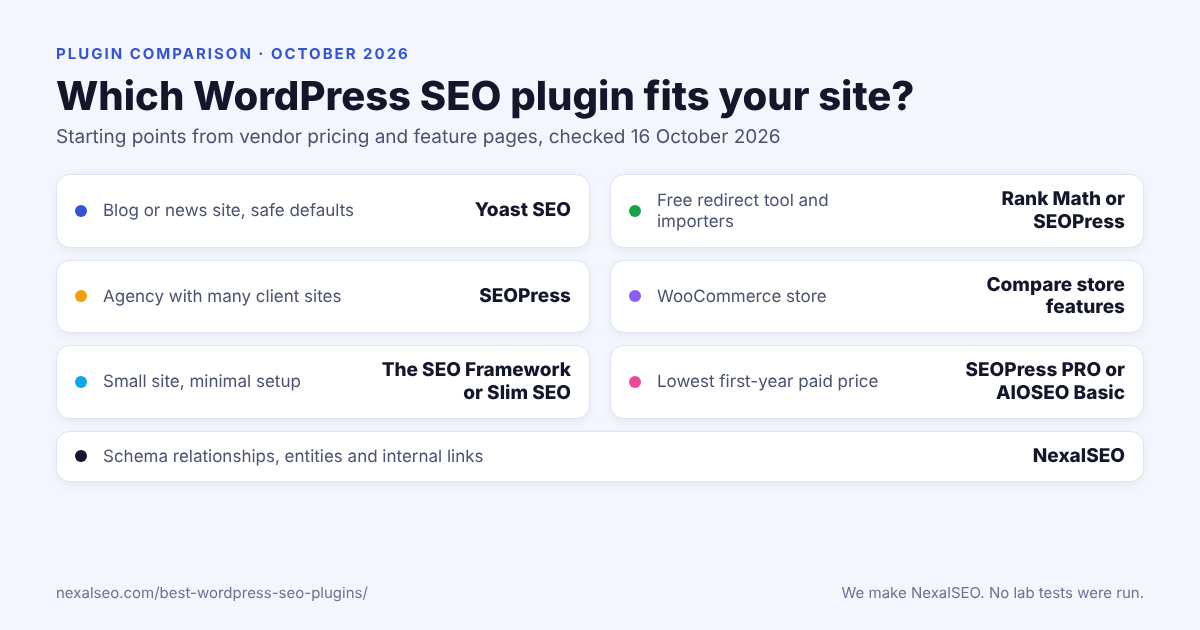
| Your situation | Start with | Why |
|---|---|---|
| Blog or news site, you want conservative defaults | Yoast SEO | The free version lists XML sitemaps, schema and readability analysis. Redirects need Premium. |
| You want a redirect tool and importers in the free plan | Rank Math or SEOPress | Rank Math lists a basic redirection manager and imports from Yoast, AIOSEO and SEOPress. SEOPress lists redirects for posts and migration tools. |
| Freelancer or agency with many client sites | SEOPress | The unlimited-site PRO licence is $149 a year. Rank Math Business covers 100 sites. |
| Online store on WooCommerce | Rank Math, AIOSEO, Yoast or NexalSEO | Yoast sells WooCommerce SEO as a separate product. Rank Math includes it in paid plans. AIOSEO lists it as a feature. NexalSEO has a store audit in the free plan. |
| Small brochure site, minimal setup | The SEO Framework or Slim SEO | Both are free and built to stay out of your way. |
| You want the lowest first-year paid price | SEOPress PRO or AIOSEO Basic | $49 a year for SEOPress PRO. AIOSEO Basic is $49.50 in year one and renews at $99. |
| You care about schema relationships, entities and internal links | NexalSEO | Connected schema graph and link suggestions are in the free plan. Pro is $79 a year. |
How this comparison was made
Most roundups of SEO plugins say they tested everything. We did not, and we would rather say so. Here is what we did instead: we opened each vendor’s pricing and feature pages on 16 October 2026 and wrote down what they state. A feature only counts here if the vendor’s page names it. When a page was silent, the table says “not stated” instead of guessing.
For every plugin we looked at the same short list: what the free version includes, whether redirects and 404 tracking are free or paid, how schema is handled, whether WooCommerce and local SEO are covered, whether AI tools are part of it, and what the cheapest paid plan costs for one site. Prices are shown the way each vendor shows them. Yoast and Rank Math list prices without VAT, and Rank Math bills annually even though it quotes a monthly figure.
Three things are missing on purpose. We left out install counts and star ratings because they change daily and we could not check them live. We did not publish speed numbers, because a fair speed test needs the same theme, host and content on every install, and we have not built that. And we did not score plugins out of ten. A single number hides the one thing that matters, which is whether the plugin does what your site needs.
Prices move and vendors rewrite their pages. If a number here is out of date, tell us and we will fix it. For a walkthrough of choosing by requirement rather than by brand, see the SEO plugin buying framework.
Side-by-side comparison
The table is wide, so scroll sideways on a phone. “Not stated” means the vendor page we read did not mention the feature, not that the plugin lacks it.
| Plugin | Free version | Redirects | Schema | Store and local | Paid from (checked 16 Oct 2026) |
|---|---|---|---|---|---|
| Yoast SEO | Yes | Premium. Free covers attachment redirects only. | Free and Premium | Local SEO in Premium. WooCommerce SEO is a separate product. | 118.80 a year (Premium, excl. VAT) |
| Rank Math | Yes | Basic manager free. Advanced 404 monitoring paid. | Advanced schema paid | Local SEO and WooCommerce SEO in paid plans | €7.99 a month, billed yearly (PRO, intro rate) |
| AIOSEO | Not stated on its pricing page | Pro and above | Listed as a feature | Local SEO and WooCommerce SEO listed | $49.50 first year (Basic), then $99 |
| SEOPress | Yes | Post redirects free. Redirect manager with 404 monitoring in PRO. | PRO | Local SEO in PRO | $49 a year (PRO, 1 site) |
| The SEO Framework | Yes | Not stated | Through an extension | Local extension | Core is free. Extension Manager starts at $0 a year. |
| Slim SEO | Yes | Yes, with 404 monitoring | Free. Visual builder in Pro. | Not stated | Pro price not published on the page we read |
| NexalSEO | Yes | Free up to 200. Unlimited in paid. | Free, 21 types in one graph | WooCommerce audit and local scanner free | $79 a year (Pro, 1 site) |
Two readings of this table are worth making. First, “free” means very different things. Yoast and Rank Math both give you a working plugin, but one keeps redirects behind a paywall and the other keeps advanced schema and 404 monitoring there. Second, the cheapest first-year price is rarely the price you keep paying. AIOSEO Basic doubles at renewal, and Rank Math’s intro rate rises from €7.99 to €8.99 a month.
The seven plugins, one by one
Each entry follows the same order: who it suits, what the vendor says you get, what it costs, and where it can let you down.
1. Yoast SEO
Best for: blogs and publishers that want a familiar plugin with conservative defaults.
Yoast is the name most people already know, and its free version covers more than its reputation suggests. By Yoast’s own feature list, the free plugin handles XML sitemaps and schema, includes readability analysis and internal linking blocks, and has an llms.txt feature. The gap shows up quickly. There is no redirect manager in the free version, only attachment redirects, so the first time you rename a URL you will be looking at Premium.
Premium adds the redirect manager with CSV import and export, internal link suggestions, local SEO features and AI generation. It costs 118.80 a year, billed annually, with prices shown without VAT in USD, EUR or GBP. If you run a shop and want Yoast’s WooCommerce add-on too, that is a separate product at 178.80 a year, so the two together come to 297.60 if you buy both.
Watch out for: the redirect paywall, the separate WooCommerce price, and the fact that AI features sit behind Premium. For a plain blog none of that matters much. For a store it adds up. Our NexalSEO versus Yoast page has a closer look at that trade.
2. Rank Math
Best for: people who want a redirect tool and importers without paying, and who expect to grow into paid features later.
Rank Math’s free version lists XML sitemaps, a basic redirection manager, canonical URL control and importers for Yoast, AIOSEO and SEOPress. The importers deserve a mention. If you are switching plugins, copying titles and descriptions across hundreds of posts by hand is the kind of job that never gets finished, and an importer turns it into an afternoon.
Paid plans add a keyword rank tracker, advanced schema (the vendor says 840+ types), local SEO, WooCommerce SEO and advanced 404 monitoring. There is also Rank Math AI, which starts with a 15-day free trial. PRO costs €7.99 a month on the intro rate and €8.99 on renewal, billed annually, so the first year is about €96. It covers unlimited personal sites and tracks 500 keywords. Business is €24.99 a month for 100 sites, and Agency is €54.99 a month. Its pricing page gives two different site limits for Agency, so confirm that number before buying.
Watch out for: reading “free” too generously. Advanced 404 monitoring and the deeper schema types are paid, so a site that wants redirects plus error tracking should check the plan table first. Our NexalSEO versus Rank Math page covers the overlap.
3. All in One SEO (AIOSEO)
Best for: buyers who would rather pay for one broad package than assemble features.
AIOSEO’s pricing page lists only paid plans. A free Lite edition may be available through the WordPress plugin directory, but we could not verify that for this update, so check the listing yourself before assuming you can start for free. The features page lists XML sitemaps, schema markup, a redirection manager, local SEO, WooCommerce SEO, a Link Assistant that suggests internal links in the editor, and a set of AI tools that includes an llms.txt generator.
Basic is $49.50 for the first year and renews at $99, for one site. Plus is $99.50 for three sites, Pro is $199.50 for ten, and Elite is $299.50 for a hundred. The Redirection Manager is listed for Pro and above, although the pricing page contradicts itself on whether Basic includes it. If redirects matter to you, treat Pro as the real entry point.
Watch out for: the renewal jump, and the redirect question above. Both are the sort of detail that is easy to miss when you compare headline prices.
4. SEOPress
Best for: freelancers and agencies with many sites, and anyone who wants redirects in the free version.
SEOPress’s free plugin lists titles and meta descriptions, canonical URLs, XML and HTML sitemaps, content analysis, Search Console integration, instant indexing, redirects for posts and migration tools. PRO adds schema, breadcrumbs, a site audit, local SEO, the full redirect manager with 404 monitoring, and AI-written metadata.
PRO is $49 a year for one site, $59 for five sites and $149 for unlimited sites. That last figure is the reason agencies look at it. A separate Insights product is $99 a year per site, and AI credits are sold as monthly plans on top.
Watch out for: schema. If you were counting on structured data from the free plugin, it sits in PRO here. And “redirects for posts” in the free version is not the same thing as a redirect manager, so test it against your actual case before you rely on it.
5. The SEO Framework
Best for: people who want a quiet plugin with very little to configure.
The SEO Framework’s homepage promises no advertisements and no database hogging, and it claims to be faster than alternatives. We have not measured that claim and you should treat it as the vendor’s. The core plugin is free. An Extension Manager adds visitor analytics, subject analysis, structured data and anti-spam, with extensions named Cord, Focus, Articles, Honeypot, Monitor and Local. The page lists pricing as starting at $0 a year and gives no figures beyond that.
The homepage does not mention sitemaps or a redirect manager, which is why the table says “not stated”. That does not prove they are missing. It does mean you should read the plugin’s documentation before assuming it replaces a redirect tool.
Watch out for: unclear extension pricing and the lack of a stated redirect feature. If you need either, confirm it first.
6. Slim SEO
Best for: small sites that want automation and as few settings as possible.
Slim SEO describes itself as fast and automated, and the free plugin covers sitemaps, schema, meta tags and redirects with 404 monitoring. Slim SEO Pro adds a visual schema builder and tools that build and monitor internal links with reports.
Watch out for: price transparency. The page we read lists no prices and no install numbers for Pro, so we cannot tell you what the upgrade costs. Fewer settings also means less control, which is fine until you need a specific override.
7. NexalSEO (our plugin)
Best for: sites that think in terms of meaning: connected schema, entities and internal links, with WooCommerce and local checks included.
NexalSEO’s free plan costs $0, covers unlimited sites, and includes meta titles and descriptions with a snippet preview, up to three focus keywords per page, and 21 schema types output as one connected graph. The named types are Organization, WebSite, WebPage, Article, Person, ImageObject and Breadcrumb, with FAQ and Product schema alongside. You also get XML sitemaps, 301 and 302 redirects with a 404 log, contextual internal link suggestions, orphan-page detection, readability checks, and a score column in your post lists.
Store owners get a five-card WooCommerce audit in the free plan, and local businesses get LocalBusiness schema and a name-address-phone consistency scanner. AI suggestions are off by default and use your own key for Gemini, Groq, OpenRouter, OpenAI or Anthropic. Settings from Yoast and Rank Math can be imported.
Pro is $79 a year for one site. It adds all five internal-linking automation engines, Wikidata and multi-location local SEO, AI-assisted WooCommerce and local content tools, unlimited redirects and priority email support. Growth is $149 a year for up to three sites, and Agency is sold through sales. See the full feature list and pricing, or the pages on WooCommerce store checks and local SEO. Development happens on GitHub.
Watch out for: we built it, so weigh our enthusiasm accordingly. Two limits you can check yourself: the free plan caps redirects at 200, and the importer covers Yoast and Rank Math but not AIOSEO or SEOPress.
How to choose without overthinking it
Start with what you cannot live without, not with the brand. Write down the two or three jobs the plugin must do on day one. For most sites that list is short: titles and descriptions, a sitemap, schema, and somewhere to put redirects when a URL changes. Then work through these questions in order.
- Do you need redirects now? If yes, Yoast and AIOSEO push you toward a paid plan. Rank Math, SEOPress, Slim SEO and NexalSEO list a free option, each with different limits.
- Is it a store? Compare the WooCommerce line items, not the plugin names. Yoast sells it separately, Rank Math includes it in paid plans, and NexalSEO runs a store audit in the free version.
- How many sites? Licences are per site on most plans. If you manage a dozen client sites, the SEOPress unlimited licence or an agency tier changes the maths completely.
- What does year two cost? Check the renewal price, not the intro price.
- How much do you want to configure? A big settings screen is a feature for some people and a chore for others. The SEO Framework and Slim SEO sit at the quiet end.
If none of those questions separates two plugins, pick the one whose free version you can install today and live with for a week. Switching is possible later, and every serious plugin here offers some kind of importer.
Free or paid?
For a small blog or a brochure site, the free versions above cover the basics: titles, descriptions, sitemaps and sensible defaults. Paying starts to make sense when you manage redirects at scale, run a store, serve local customers from several locations, or look after more than a couple of sites. Our free versus premium guide goes through where that line usually falls, and the Yoast, Rank Math and AIOSEO comparison goes deeper on the three biggest names.
It is also fair to ask whether you need a plugin at all. Some sites get by on a theme that handles titles and a handful of small tools. We explain when that works in do you need an SEO plugin?
Switching plugins without losing rankings
Changing plugins is where most of the damage happens, and it is rarely the plugin’s fault. A few habits prevent nearly all of it:
- Back up the site and export your current plugin’s settings before you touch anything.
- Run one SEO plugin at a time. Two plugins printing titles, canonical tags or schema produce duplicates, which is a problem we cover in fixing conflicting markup.
- Use the new plugin’s importer, then spot-check ten or twenty pages for titles, descriptions and canonicals.
- Keep every URL the same. If a URL has to change, set a 301 redirect on the same day. The difference between 301 and 302 is explained in our redirect guide.
- Re-submit your sitemap and watch Search Console for a couple of weeks.
The full checklist is in migrating from another SEO plugin without losing rankings.
What an SEO plugin cannot do
A plugin handles the technical layer: titles, descriptions, sitemaps, canonical tags, schema and redirects. It does not write pages worth ranking, earn links, or fix a slow host. If a page does not answer what people are searching for, no plugin will rescue it. Think of the plugin as the tidy filing system and the content as the thing being filed. For the content side, start with the topical map guide and the one on how internal links work.
Frequently asked questions
What is the best SEO plugin for WordPress?
There is no single winner. Yoast SEO suits blogs that want safe defaults, Rank Math and SEOPress suit people who want a redirect tool without paying, AIOSEO suits buyers who prefer one guided package, and The SEO Framework or Slim SEO suit small sites with minimal needs. Pick by the jobs your site needs done, then check the renewal price.
Is there a free WordPress SEO plugin with redirects?
Yes, with limits. Rank Math lists a basic redirection manager, SEOPress lists redirects for posts, Slim SEO lists redirects with 404 monitoring, and NexalSEO allows up to 200 redirects on its free plan. Yoast’s free version only handles attachment redirects, and AIOSEO lists its Redirection Manager for Pro and above.
Which paid SEO plugin is cheapest?
On first-year price for one site, SEOPress PRO is $49 a year and AIOSEO Basic is $49.50. Rank Math PRO works out to about €96 in year one, NexalSEO Pro is $79, and Yoast Premium is 118.80. Currencies and VAT treatment differ by vendor, and some prices rise at renewal, so compare the second year before you decide.
Can I run two SEO plugins at the same time?
Avoid it. Two plugins can each print a title tag, canonical URL or schema block, which leaves duplicates for search engines to sort out. Switch with an importer, deactivate the old plugin once the new one is configured, and check a few pages afterwards.
Which SEO plugin is best for WooCommerce?
It depends on how much you want to pay and what you need. Yoast sells WooCommerce SEO as a separate product at 178.80 a year, Rank Math includes WooCommerce SEO in its paid plans, AIOSEO lists it as a feature, and NexalSEO includes a store audit in its free plan. Compare the specific features you need, such as product schema and category handling.
How do I switch SEO plugins without losing rankings?
Back up first, use the new plugin’s importer, keep every URL unchanged, and set 301 redirects for anything that has to move. Then spot-check titles, descriptions and canonical tags on a sample of pages and watch Search Console for a few weeks.
Do SEO plugins improve rankings by themselves?
No. They take care of technical basics such as titles, descriptions, sitemaps, schema and redirects. Rankings still depend on content that answers the search, links from other sites and a site that loads reasonably fast.
Will an SEO plugin slow down my site?
Any plugin adds some work, and vendors make their own speed claims. We have not measured speed for this page. The practical way to check is to test your own site on a staging copy before and after the switch.
How often is this page updated?
We re-check prices and feature lists when we notice vendors change them. The date at the top shows the last full check.
Keep exploring
What schema markup does
The structured data these plugins print.
XML sitemaps
What a sitemap should and should not include.
Redirects and 404 monitor
Keep old URLs working after a change.
The llms.txt file
What it is and what it does not do.
How entities work
How search engines tell things apart.
All comparisons
Every side-by-side on one page.
Sources
Prices and features were read from these vendor pages on 16 October 2026. Vendors change them without notice, so check the current page before you buy.
- Yoast features and Yoast plans and pricing
- Rank Math pricing
- AIOSEO pricing and AIOSEO features
- SEOPress
- The SEO Framework
- Slim SEO
- NexalSEO pricing and features pages (our own, as linked above)
Last reviewed: 16 October 2026. Written by Anis Harbaoui, SEO specialist.